SMS opt-in
Reviewer evidence. Updated October 18, 2026.
CourtKeeper sends texts in three programs, and each has its own unchecked consent box. Club members choose club announcements inside the authenticated member app. A teaching pro's students and their parents or guardians choose lesson reminders and clinic and camp messages on a preference page reached from an email link. No consent is collected through the public demo-request form.
Member flow
- A club invites a member to CourtKeeper. The member opens the invitation link. A new member sets a name and password. A returning member just confirms.
- The member opens My account, adds a phone number in Profile if needed, and goes to Notifications.
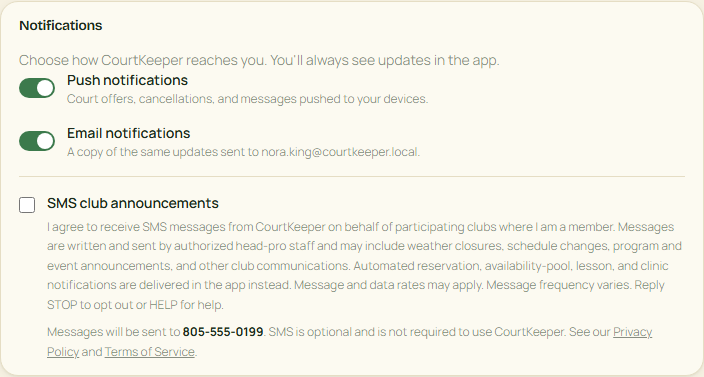
- The member may actively check the standalone SMS consent box shown below. It is unchecked by default, SMS is optional, and declining does not prevent use of CourtKeeper.
What is recorded
When a member checks the box, CourtKeeper records the consent, the consent version, the phone number, the date and time, the request IP address and the browser. The member can later clear the checkbox to opt out. Replying STOP to any CourtKeeper text also opts the member out, as described in the Terms of Service.
Lesson reminders and clinic and camp messages
These texts go to a teaching pro's students and to their parents or guardians, who have no CourtKeeper login. CourtKeeper is the sender: every text starts with "CourtKeeper:" and names the pro when the name fits. Otherwise it uses the pro's first name or leaves the name out.
- A pro adds a student's contact in CourtKeeper: a name, an email address and a US mobile number. Adding a contact does not opt anyone in, and a pro cannot check a box for anyone.
- CourtKeeper emails the contact a preference link.
- The link opens the preference page. No login, account or app is needed.
- The page shows the pro and the workspace the texts come from, and the exact phone number they would go to.
- Two separate boxes follow, both unchecked: one for lesson reminder texts and one for clinic and camp message texts. Each box shows its own disclosure and links to the Privacy Policy and Terms of Service. Email is a separate choice, and a time zone sets the quiet hours.
- Saving records each choice on its own. Checking one box does not check the other.
The two disclosures
Lesson reminder box:
I agree to receive automated lesson, clinic and camp reminder text messages from CourtKeeper about my sessions with the teaching professional shown above, at the phone number shown. Consent is optional and is not a condition of purchase. Message frequency varies. Message and data rates may apply. Reply STOP to opt out or HELP for help.
Clinic and camp message box:
I agree to receive text messages from CourtKeeper that pass on messages from the teaching professional shown above about that professional's clinics and camps that I am signed up for, at the phone number shown. Consent is optional and is not a condition of purchase. Message frequency varies. Message and data rates may apply. Reply STOP to opt out or HELP for help.


Sample messages
- Lesson reminder: CourtKeeper: Lesson with Alex Tennis Mon Oct 12, 4:00 PM PT. Reply STOP to opt out.
- Clinic and camp message: CourtKeeper: Message from Alex Tennis about Junior clinic: Rain today, clinic moved to Thursday. Reply STOP to opt out.
- Lesson reminder opt-in confirmation: CourtKeeper: Lesson reminder texts for sessions with Alex Tennis are on. Msg freq varies. Msg & data rates may apply. Reply HELP for help, STOP to opt out.
- Clinic and camp message opt-in confirmation: CourtKeeper: Clinic and camp message texts from Alex Tennis are on. Msg freq varies. Msg & data rates may apply. Reply HELP for help, STOP to opt out.
Quiet hours
Texts are not sent between 9 PM and 8 AM in the time zone chosen on the preference page. A clinic or camp message that would arrive in that window waits until 8 AM. One phone receives at most ten CourtKeeper texts in any 24 hours.
How to opt out
- Reply STOP to any CourtKeeper text. STOP ends CourtKeeper texts to that phone and withdraws both the lesson reminder and the clinic and camp message consent. Replying START lifts the block and resumes club announcements for a member who had opted in, but lesson reminders and clinic and camp messages need a new choice from a fresh email link.
- Use the preference link. "Turn off all reminders and messages" works even after the link expires.
- Use your account. If the student is linked to your CourtKeeper account, you can turn reminders and messages off there.
- Reply HELP for help, or email support@courtkeeper.io.
What is recorded for these texts
For each choice, CourtKeeper records the wording and version shown, what the consent was for and which pro it was given to, a protected (hashed) form of the phone number, the date and time, how it was given, the IP address and browser, and any later withdrawal.
This page is documentation only. It does not collect a phone number or consent, create an account, or request a demo.